

📖 Facebook Plus: The Ultimate Modded Version
Facebook Plus for iOS offers many features that the official app doesn't provide. It allows users to use Facebook without restrictions. By downloading Facebook Plus for iPhone outside the App Store, you can experience these amazing features. The most notable features include running a duplicate Facebook account alongside the original, saving Reels and videos directly from Facebook Plus to your camera roll, and a dedicated download button for stories. Many more additions await you after downloading Facebook for iPhone without the App Store.
📲 Download Facebook Plus Now
Version Latest | iOS 14+ | ~60 MB
📥 Download Free (iOS)No Jailbreak Required | Works with official Facebook app
❓ Can You Download Facebook for iPhone Without App Store?
Facebook Plus is an unofficial app because it contains additional settings and features not found in the official app. This violates Facebook and Apple's privacy and security policies. Therefore, you won't find Facebook Plus in the official App Store. It's only available through third-party stores. Use the download link above to get Facebook Plus for iOS.
✨ Facebook Plus Features / المزايا
⚠️ Facebook Plus Drawbacks / العيوب
- ❌ No Arabic language support / لا يدعم اللغة العربية
- ❌ Story feature may not work / لا يدعم ميزة ستوري فيس بوك
- ❌ Messenger voice/video calls not supported / ماسنجر لا يدعم المكالمات الصوتية والمرئية
🛠️ How to Fix "Untrusted Developer" Error
📌 Step 1: Go to Settings → General on your iPhone.
📌 Step 2: Tap on VPN & Device Management.
📌 Step 3: Find the Facebook profile and tap "Trust".
📥 How to Save Videos from Facebook Plus
Click the download button that appears automatically on Facebook videos, as shown below:
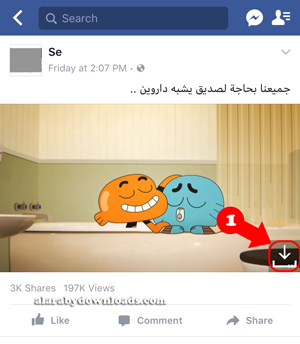
Save video from Facebook Plus for iOS
Choose the video quality (SD, HD) from the options that appear:
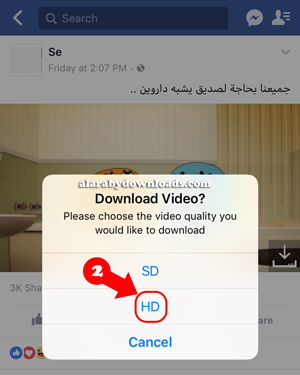
Choose video quality (SD/HD)
Go to the downloads folder: Settings → FB++ Settings → FB++ Downloads
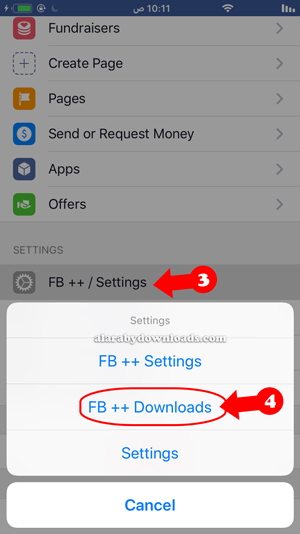
Access the downloads folder
⚙️ Facebook++ Settings / اعدادات فيس بوك بلس
You can access Facebook++ Settings from the More section at the bottom right of the main interface. Tap the ≡ icon, then tap FB++ Settings.
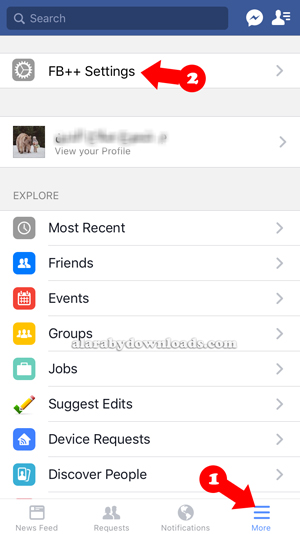
Facebook Plus Settings
❓ Frequently Asked Questions
❓ Is Facebook Plus safe to use?
Yes, Facebook Plus is a modified version that has been tested. However, use it at your own risk as with any third-party app.
❓ Can I use my original Facebook account?
Yes, you can log in with your existing account. The modded version works alongside the original app.
❓ Why doesn't the app open after installation?
You need to trust the developer certificate. Go to Settings → General → VPN & Device Management → Trust the profile.
💡 Final Thoughts
Facebook Plus is the ultimate modified version for users who want to unlock the full potential of the platform. With features like downloading videos, securing the app with a password, and running alongside the official app, it's the best choice for Facebook enthusiasts. Download now and enjoy all the premium features for free!
📢 Download Facebook Plus Now and Enjoy All Features!
⬇️ Download Free (iOS)© 2026 AlFotesr Tech | Facebook Plus for iOS: Complete Guide 2026
📢 Last Updated: May 2026


0 Comments