

🎬 Video Star Plus for iOS – Professional Video Editing App
Download Video Star Plus for iPhone – An app that allows you to create music videos with various special effects to make them just the way you want. It's a fun tool that lets you record video and add the song of your choice. Video Star++ is one of the most important tools for creating short videos, and anyone can produce videos on their mobile devices. Many users prefer using Video Star Plus for iPhone over other programs due to the professional transitions that the modded Video Star app is known for.
📱 About Video Star Plus for iOS (Video Star++)
This program offers multimedia options that create simple videos on mobile devices. Users can edit videos that have been shared or saved from the internet, apply filters and new transitions easily. The program contains simple tools and is considered easy to use.
Video Star is a production app that allows you to create custom music videos for yourself with different texts, images, and backgrounds. It gives you the ability to add custom effects to the song, as well as take advantage of the many upgrades it contains, such as advanced effects.
Video Star++ iOS 14 is a music video maker. With Video Star for iPhone, you don't need to be a good singer. This app is all about the visual side of things. Use your iPad or iPhone and unleash your creativity as you smile, wink, or groove to the music.
📲 Download Video Star Plus Now
Version Latest | iOS 14+ | ~60 MB
📥 Download Free (iOS)No Jailbreak Required | All Features Unlocked
✨ Video Star Plus Features / المميزات
🛠️ How to Install Video Star Plus on iPhone
📌 Step 1: Click the download button above to start downloading.
📌 Step 2: If you see "Untrusted Developer" message, go to Settings → General → VPN & Device Management.
📌 Step 3: Find the Video Star profile and tap "Trust".
📌 Step 4: Open the app and start creating amazing videos!
📖 Video Star Plus Tutorial / شرح انتقالات برنامج فيديو ستار بلس
After downloading Video Star Plus for iPhone, open the app. On the main screen, you'll see icons, and the app will explain each icon's function.

Video Star Main Screen
To add a new video, tap the "+" button. A window will appear to select the video you want to edit.

Start Creating Video
Once you enter the editing window, you'll find all the tools. To edit and add filters, tap "Create Video".
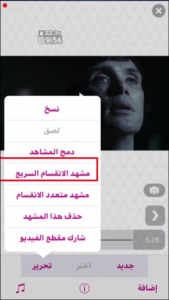
Start Editing Video
Now you'll move to the most important interface, which contains options for editing the beginning and end of the video. Tap "Edit" and choose "Quick Split Scene" or other options.

Import Video and Create Transitions
A screen will appear with a box explaining the transition. After confirming, you'll see options to easily split the video. You can also set the beginning or end of the video.
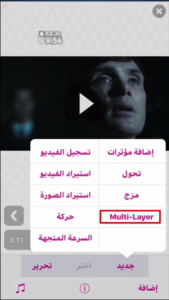
Multi-layer Editing Options
Tap "Multi-layer" to access another screen with additional editing options.
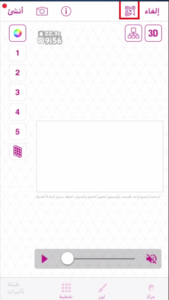
Save Video Window
Tap the icon at the top, then tap "Import". A window will ask if you want to import – tap "Yes".
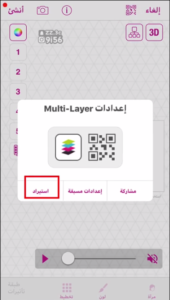
Download Video to Studio
And that's how you've created a new transition using Video Star Plus for iPhone!
❓ Frequently Asked Questions
❓ Is Video Star Plus safe to use?
Yes, Video Star Plus is a modified version that has been tested and is safe. However, use it at your own risk as with any third-party app.
❓ Can I use Video Star Plus without jailbreak?
Yes, the modded version works without jailbreak. Just download and trust the developer certificate.
❓ Why doesn't the app open after installation?
You need to trust the developer certificate. Go to Settings → General → VPN & Device Management → Trust the profile.
💡 Final Thoughts
Video Star Plus is the ultimate modified version for users who want to create professional music videos on their iPhone. With features like professional transitions, custom filters, and multi-layer editing, it's the best choice for video editing enthusiasts. Download now and start creating amazing videos!
📢 Download Video Star Plus Now and Start Creating!
⬇️ Download Free (iOS)© 2026 AlFotesr Tech | Video Star Plus for iOS: Complete Guide 2026
📢 Last Updated: May 2026


0 Comments